
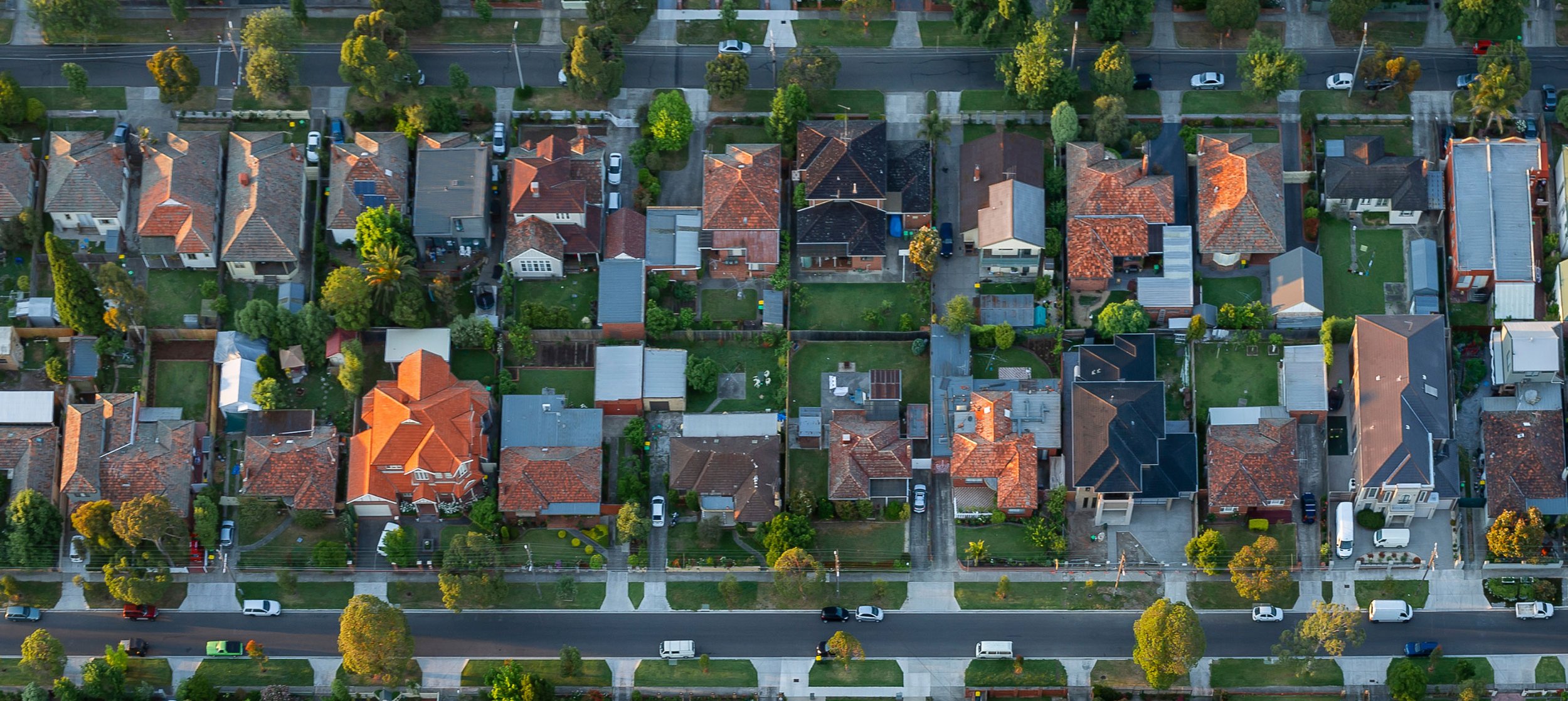
Using SunSPOT Solar Calculator
Help using SunSPOT
SunSPOT FAQs
Read all our frequently asked questions about using SunSPOT here
-
SunSPOT was built by data analysts and engineers at UNSW Sydney’s School of Photovoltaic and Renewable Energy Engineering and is far more sophisticated than other freely available solar calculators.
Unlike other free tools, the premium version of SunSPOT can help you pinpoint the best areas on a rooftop for solar panel output. How? SunSPOT uses 3D spatial mapping LiDAR data to read the slope and orientation of a roof area, and to assess the impact of shading on that area from nearby structures. And SunSPOT uses Bureau of Meteorology weather data to estimate the amount of sunshine that falls on each 0.25 square metres of the roof across the year.
Users will get the most accurate results by uploading 12 months of interval meter data. But sometimes this is not available.
For more see Why you can trust SunSPOT
If smart meter data is not available, for residential users, SunSPOT uses machine learning to create a synthetic load profile for the household. You can add details from your bills and answer some questions about energy use in your home.SunSPOT uses this information to create electricity usage data for a typical year based on a machine learning model trained with data from thousands of households.
-
In less than two minutes, SunSPOT can quickly and simply deliver householders an estimate of the cost of, and savings to be made from, installing solar or batteries.
Get an instant estimate (1-2 minutes)
Users can get an instant estimate by simply inputting:
• the address
• number of people living at the property
• if there is gas, air conditioning, underfloor heating or a pool at the property.
Instant estimates are based upon an indicative electricity usage ‘profile’ that SunSPOT creates for your home through machine learning. It draws on the information you provided, electricity usage data from a sample of approximately 4000 homes, historical local weather data and average electricity tariffs for your region.
Using this profile SunSPOT can then estimate:
• a suggested system size for early payback of your investment
• a range of costs for the installed system
• annual savings from solar
• the annual electricity bill, and
• the payback period.
Get a more tailored estimate by adding information from your electricity bill (5-15 minutes)
Through the Energy usage and Electricity plan tabs, SunSPOT users should add further information to improve the accuracy of the synthetic electricity usage profile and the bill estimation.
Some of the questions SunSPOT asks under Energy usage are about the appliance use in your home such as, “How many fridges and/or freezers do you have?” and “How many rooms in your property are heated?”
Having a recent electricity bill on hand will help you answer these questions:
• Does your bill show separate peak and off-peak usage?
• How much electricity do you use per day, on average, in kWh?
• Do you have a controlled load?
Under Electricity plan you have the option to adjust the charges (tariffs) you pay for electricity. These can be found on your electricity bill.
You can leave the solar feed-in tariff that is already there as it is because it should automatically reflect the usual pricing in your area. The feed-in tariff is the amount you get paid per kWh of solar electricity that you don’t use at home and is instead exported into the grid.
Alternatively, if you have used Energy Made Easy or Victorian Energy Compare to find a competitive solar electricity retail plan, you can input the tariffs from it in.
Read more: Understanding your electricity bill
Get the MOST accurate estimate – using smart meter data (15+ minutes)
The benefits of solar depend on when you use electricity, as well as how much you use. If there is a smart meter at the property, it has logged your electricity use every 15 or 30 minutes across every day and across every season. This interval meter data is the clearest picture of your energy use available and by uploading this to SunSPOT you will get the most accurate estimates.
To access this data you need to contact your distribution network service provider (DNSP) and ask for “12 months of detailed interval meter data in NEM12 format”.
If you don’t have 12 months of data you can still use it but it will be less accurate.
You can find your DNSP named on your electricity bill under ‘Faults and Emergencies’.
We have compiled the links to request NEM12 interval meter data for all the DNSPs here.
Find out more:
For commercial properties, it’s best to use smart meter data
We strongly suggest that, when using SunSPOT on commercial properties, you should source and upload the NEM12 smart meter data, if available. This will give the most accurate estimate of solar and battery sizing and savings.
Commercial sites can be assessed by SunSPOT using the average daily consumption from the bill, an estimation of the available roof area and selecting a business type from the drop-down menu. However, businesses have diverse patterns of energy use and these estimates may not reflect the electricity use at the site very accurately.
The most useful estimate will always come from uploading 12 months of NEM12 smart meter data which accurately plots electricity use at the site for the past year.
-
Yes, SunSPOT includes the federal battery rebate in its cost estimates. This is automatically applied based on usable battery capacity and is calculated at $344 per usable kWh (equivalent to $37 per STC).
However, state government rebates are not included. These vary by location, may change over time, and often have specific eligibility criteria. We recommend checking what’s currently available in your area and whether you qualify.
-
SunSPOT can be used for apartments in some cases.
If you want to find out if solar can meet the electricity usage in common areas, you will need smart meter data for the common property, and the electricity tariffs. SunSPOT can then suggest the optimal size solar system for the best return on investment. You can then try to map this size system onto the building’s roof.
If you are looking to install solar for a single apartment, SunSPOT can help estimate the best system size to meet your energy use but be aware that you will need permission from the strata body. In some circumstances, a large solar system can be installed to supply many apartments, but the current version of SunSPOT is not configured for these systems.
SunSPOT is most suitable for estimating the solar savings for houses (freestanding, semi-detached and terraces). It is also very good for commercial buildings where interval meter data is available. -
Yes. If you have interval meter data SunSPOT can accurately match a solar system size to the electricity usage at a commercial building and estimate the savings. SunSPOT can also estimate the savings with battery sizes up to 100 kWh for commercial users.
The current version of SunSPOT assumes the battery will be operated to maximise self-consumption of solar generation or to minimise the grid electricity used during peak periods.
By using the mapping feature and placing panels on the roof, commercial SunSPOT users can also get an estimate of the system size that the roof can accommodate.
If you don’t have interval meter data, SunSPOT has example load profiles for various types of small businesses and commercial buildings. These provide electricity usage patterns that might be expected for a particular type of business e.g. a restaurant or a retail business, and can be scaled using electricity usage information from your business’s bill. SunSPOT can then calculate bill outcomes, savings and recommend a suitable solar system size that can maximise return on Investment.
However, the results will not be as accurate as using 12 months of interval meter data which is a true and accurate record of electricity usage across all four seasons. -
Yes. If you have smart meter data you can use SunSPOT to find out if solar can meet the electricity usage in common areas of apartment complexes.
Get your smart meter data -
SunSPOT uses Solar Choice’s Solar Price Index and Battery Price Index to estimate the costs. This is the most comprehensive solar and battery pricing index available in Australia and we update the values quarterly.
The solar system costs include the Federal Government’s STC rebate and GST. The battery prices include installation and GST and assume that the battery is being bought and installed with the solar system.
SunSPOT users should be aware that prices can be affected by many things including factors like a steep roof, tiles, a multi-storey building, remote area, difficult access and other specific site needs. There are also variations in system design, the quality of the installation, the support offered post installation, and the quality of the solar panels, inverter, battery, wiring and mounting.
All the costs we use are averages – no two solar or battery quotes will be the same! Use these estimates as a guide only. -
One kilowatt (kW) is 1000 watts (W). These are measures of power.
In perfect sunny conditions, a 440W panel will produce around 440 watts, depending on your location and climate. And in perfect sunny conditions, a 6kW system will produce nearly 6kW of power over the course of an hour.
The many brands and models of solar panels each have their own power output rating, usually between 300-600W. SunSPOT’s calculations use solar panels that are 440W. When mapping, panel dimensions and wattage can be adjusted using the 'Advanced Options' settings.
-
This depends upon the rating (in watts) of each panel. For residential properties, SunSPOT’s calculations use solar panels that have a power output of 440 watts. When mapping, panel dimensions and wattage can be adjusted using the 'Advanced Options' settings.
If 440W panels were installed in a 6.6kW system, 15 panels would be used.
(440W x 15 = 6600W) -
A solar system’s ‘size’ is measured in kilowatts (kW) which is a measure of power. The power in kW is the rate of the flow of electricity being produced.
(The solar system’s size often refers to the kW capacity of the solar panel array. The inverter may be a different kW size.)
A kilowatt hour (kWh) is the unit for energy or amount of electricity. The amount that a solar system generates over time is given in kWh. And the amount of electricity that you use and are billed for is also measured in kWh.
For example, you may have a 6kW system. This refers to the power capacity of the solar panels (not the inverter).
The 6kWs of solar panels have the potential to generate up to 6kWh in an hour under perfect conditions.
In reality they will usually generate less than this for many reasons including:
shading, haze, smoke, dirt
seasonal and regional climatic impacts on peak sunshine hours
time of day
the orientation and angle of the panels
the inverter.
See the FAQ : Why is my inverter only 5kW when my panels are 6.6kW?
-
Meter data is an accurate measure of your electricity usage taken every 15 or 30 minutes. This is recorded by a smart meter or an interval meter at the property. Not all properties have a smart meter (see below). SunSPOT allows you to upload 12 months of meter data. Doing this will improve the accuracy of the assessment.
Go to How to get your meter data to find out how to request it. -
If you have a smart meter at the property, you can access your meter data by requesting it from your electricity distributor, called the DNSP.
If the property is in Victoria, it has a smart meter. If you have a Time of Use tariff (meaning you are billed at different rates for different times and days of the week) or have had solar installed in the last three years, then you will have either a smart meter or an interval meter and can request your meter data.
You may have a smart or interval meter even if you are on a flat-rate tariff, so if you’re not sure you can check with your DNSP.Go to How to get your meter data to find out how to request it.
-
The Distribution Network Service Provider (DNSP) in your area is different to your electricity retailer and is the organisation that owns and controls the physical infrastructure used to distribute electricity (like power poles, transformers, sub stations and wires). They are also required by law to send you your metering data if you request it.
You can find the name of your DNSP by looking under the “Faults and Emergencies” heading on your electricity bill.
Go to How to get your meter data to find out how to request it.
-
Uploading 12 months of meter data to the SunSPOT tool will allow us to calculate your estimates based on your actual energy use, instead of synthetic profiles or averages. These estimates will be more accurate, and will give you a clearer picture of the impact that a solar system could have on your bills and electricity usage.
-
APVI and SunSPOT will not share your details or data with any third parties. Where we explicitly ask to save your data, and you provide your consent, it is only used for research purposes and to improve the tool. All information is de-identified (unless you give us specific permission to keep your address) and stored securely.
You will not be contacted by any solar sales companies after using SunSPOT. The tool is private and secure.
-
Households often use a lot of electricity when people are home in the evenings (cooking, showering, using lights and appliances) but this is not when your solar system is generating free electricity.
The main benefit of having a battery connected to your solar system is that it can store all the free solar electricity that you don’t use during the day so you can use it at night, instead of expensive electricity from the grid. If you have a Time of Use tariff with different peak, shoulder and off-peak rates, electricity during the evening peak is even more expensive making batteries even more useful.
There are plenty of other benefits that batteries can offer but this depends upon the specific battery system, how it’s set up and the electricity plan you are on. If configured correctly, a battery can provide power to your house during a blackout. A battery can make you less reliant on grid power and protect you from peak electricity price rises. In the future, your electricity retailer may even buy your battery-stored solar power from you at higher rates during peak periods.
-
For residential users SunSPOT offers you a choice of four common batteries sizes to apply in your estimate: 6kWh, 8kWh, 10kWh, 13.5kWh and 18kWh. SunSPOT estimates the cost of installing the battery, and estimates the savings you could make on your bills with the battery, as well as the payback time.
Try them all to see which size produces the fastest payback.
If the payback is near to or more than 10 years, it is likely not a cost-effective investment as it may need replacing before it has paid for itself.
The size of a battery in kWh is a measure of the amount of electricity that can be stored in the battery. The best battery size for you will depend on how much spare solar you generate during the day, and how much you pay for the electricity you use at night. The bigger the battery size is in kWh, the more solar you can save and use at night or when the sun is not shining.
-
SunSPOT assumes that under a single rate or flat tariff the battery stores unused solar electricity generated during the day (that would otherwise have been exported to the grid), and then discharges that electricity to meet the household’s electricity usage when there is not enough solar at any time.
Under a time of use tariff (TOU) , SunSPOT assumes the battery will charge in the same way as above by storing unused solar electricity, but in the evening it will discharge electricity during the peak pricing period only.
In this way, customers with batteries can reduce their imports of grid electricity during the expensive peak pricing period and consume more electricity from the grid during cheaper off-peak or shoulder periods.
You can explore how these affect savings by trying out batteries and different tariffs in SunSPOT.
-
Yes. Select 'Upgrade your solar' and upload your meter data. Then click on the 'Add a Battery' tile and choose your preferred battery size. SunSPOT will estimate the additional savings, payback period, and installation cost for the battery.
You can compare results across different battery sizes: 6 kWh, 8 kWh, 10 kWh, 13.5 kWh, and 18 kWh.
-
Home solar batteries last between 5-15 years, depending upon how the battery is charged and discharged, and the warranty.
If SunSPOT calculates a payback time of 10 years or more for the battery, it is likely not cost effective to invest in a battery as it may need to be replaced before it has paid for itself.
It will, however, protect you from further electricity price increases, and it will reduce your dependence upon grid electricity, lowering your household carbon emissions.
-
An electricity tariff is the amount that is charged per unit (kWh) of electricity used (consumed).
There are several different types of tariffs, with the most common ones outlined below.
Flat or single rate tariff – These tariffs offer one price for all electricity consumed no matter what time of day, or day of the week. They are typically around 25-35c/kWh.
Time of use (TOU) tariff – TOU tariffs incur a different price depending on the time of day the energy is consumed. This is often broken down into peak, off-peak and shoulder periods. Peak is usually weekday evenings, and sometimes also in the morning.
Feed-in tariff (FiT) – FiTs only apply if you have a solar system and an electricity plan that pays for your unused, exported solar. It is the amount paid to you for excess solar generation that is exported to the grid. This can vary greatly between retailers and in different states but is often between 3-10c per kWh.
See How to understand your bill for more on this.
-
Installing a solar system on your property gives you the ability to generate electricity to run your appliances. This means that you don’t have to buy as much electricity from the grid, which you would be charged for.
If you have a feed-in tariff (FiT) in your electricity plan, you can earn credit on your bill for exporting the solar that you don’t use to the grid. This credit can build up over summer when there are more solar producing hours in the day, and can offset your electricity costs for the following winter.
But the price you pay for electricity from the grid is much higher than the price you are paid (FiT) for your exported solar. So your solar is worth more to you when you use it on your property than when you export it.
Your free solar is available when the sun is shining on the panels. To get the most savings from your solar system, solar owners should move as much of their appliance use as possible to daylight hours, or maybe consider a battery which can store solar electricity for when you need it.
Some electricity plans charge you a single rate per kWh for electricity all day, every day. Others charge a different rate per kWh at peak, shoulder and off-peak times. This is called a time of use electricity plan. Peak times are the most expensive and are usually in the evenings when everybody is home cooking, using lights and appliances. It’s also when solar systems are not generating electricity, so with this type of tariff a battery can save you even more.
SunSPOT allows you to try out different tariff types (single rate or time of use) to see how these can impact your savings with a solar system. You can also try out different size systems, and what the impact of adding a battery might be.
-
SunSPOT uses solar panels with a capacity of 440W and dimensions of 1.13m x 1.76m for mapping to your roof and calculating the estimates of generation and savings.
When mapping, panel dimensions and wattage can be adjusted using the 'Advanced Options' settings.
-
You can get a very good understanding of what size solar system can fit on your roof with SunSPOT. Select “Map your roof” on the landing page and enter your address.
If you are using the premium version of SunSPOT, you will see dots over the map. You can make these more visible with the slider on text box on the left-hand side. Red and orange dots indicate the best places for solar panels.
After locating your roof on the map and zooming in, you will be able to drag, rotate and drop panels onto your roof area. You can add panels to group with the + and – buttons, and add another group if you would like. You can fill your available roof space or add the suggested size to maximise your return on investment.
Play around with recalculating the cost, savings and payback estimate as many times as you like to find the system size that suits your roof and your budget.
The amount of space a solar system will take up on your roof will depend on the capacity of the system and the size of the solar panels. For example, a 6.6kW system based on a typical 440W panel of 1.13m x 1.76m would cover about 30m2, however it’s important to note that panel capacity (in watts) and dimensions can vary between manufacturers.
-
Rack mounting allows the installer to change the slope and orientation of your panels to maximise generation overall or at particular times. It is most commonly used on flat roofs. Flush mounting matches the existing slope of your roof. There are additional costs for rack mounting that aren't yet included in SunSPOT calculations, and not all roofs are suitable for rack mounting.
Ask your solar installer if your roof is suitable for rack mounting.
-
When you receive an estimate from SunSPOT it includes a time in years that it will take for that solar system to pay for itself in the savings it has made for you.
This is a useful and simple measurement to compare estimates as you change some of the inputs.
However, it’s important to note that these payback estimates assume that your electricity usage and tariff remain the same, which may not be the case. For instance, you might buy an electric vehicle that increases your electricity use, or electricity tariffs might increase. In both these cases, the payback period for a solar system would decrease.
Adding a battery will add significant cost to the system and you will notice the payback period is much longer. Try it out.
-
The premium version of SunSPOT identifies the best position for solar panels on your roof with red dots. This is where solar panels will be most productive because this is where the most solar radiation falls.
The premium version of SunSPOT can assess the impact of shade from nearby trees and structures on each part of your roof. Shade reduces the output of electricity from solar panels which, ultimately, reduces savings and increases payback times. SunSPOT uses spatial mapping 3D LiDAR data to do this.
You can view graphs showing the amount of shading a roof plane receives by clicking on Solar system details, selecting the group of panels you are interested in, and then clicking on technical Details.
For the standard version of SunSPOT, you need to estimate the amount of shading on your roof. Place ‘shading objects’ where there are trees or nearby buildings to help us simulate the shading on your roof.
-
Very occasionally SunSPOT does not complete the calculation for the estimate. This can be due to various factors, such as internet speed or the browser being used.
SunSPOT's calculations are complex and the results can take a few seconds.
If you find that SunSPOT continues to not be able to complete the calculation, or you have other feedback to share you can lodge this here. This will help us improve the tool.
-
In the premium version of SunSPOT:
Step 1
Once you have found your roof, make sure it's centered in the mapping window. You can always click back onto the Step 1 tab to reposition your roof on the screen. If you are zoomed out too far out on the map, you may find it difficult to accurately use this mapping tool.
Step 2
Use the coloured dots to help determine the best position for solar panels on your roof. The darkest red dots are areas with the most solar radiation, and are usually on the north-facing parts of a roof.
The visibility of the dots can be adjusted using the Dot visibility slider.
You could consider east and west facing roof areas which will generate less but can produce energy in mornings or evenings.
Step 3
Now you can start adding solar panels by selecting the Add group option. For best results, the panel groups should be placed just within the edges of the roof and aligned with the bottom edge.
Panels are usually installed in portrait, with the short edge aligned with the bottom of the roof. However, sometimes landscape orientation is used to fit more panels. Your panel groups should never cross two different roof faces or overlap each other.
When you've added a panel group, you can move it by clicking on the panels and dragging to position.
To align the panels to your roof, you can click and drag the space around the group to rotate it.
The +/- buttons on each side of the panel group can be used to control the number of panels in that group.
The white triangle arrow shows you the direction that the panel group is facing. Clicking this arrow changes the direction the panels face by 90 degrees.
If you want to add solar to more than one roof face, or add an extra row of panels, you will need to add a second group by pressing Add group again.
To remove an entire group, simply select the group you'd like to remove and click the Delete group option shown to the left.
Once you are happy with your selection, press Apply to my estimates to update the estimates for your mapped solar system.
In the standard version:
Step 1
Once you have found your roof, make sure it's centered in the mapping window. You can always click back onto the Step 1 tab to reposition your roof on the screen. If you are zoomed out too far out on the map, you may find it difficult to accurately use this mapping tool.
Step 2
The sunniest areas on your roof are usually north facing and have little to no shading. You could consider east and west facing roof areas which will generate less but can produce energy in mornings or evenings. Place shading objects where there are nearby trees or buildings. Use the simulated shading image to help position your solar panels to avoid shaded areas.
Step 3
Now you can start adding solar panels by selecting the Add group option. For best results, the panel groups should be placed just within the edges of the roof and aligned with the bottom edge.
Panels are usually installed in portrait, with the short edge aligned with the bottom of the roof. However, sometimes landscape orientation is used to fit more panels.
Your panel groups should never cross two different roof faces or overlap each other.
When you've added a panel group, you can move it by clicking on the panels and dragging to position.
To align the panels to your roof, you can click and drag the space around the group to rotate it.
The +/- buttons on each side of the panel group can be used to control the number of panels in that group.
The white triangle arrow shows you the direction that the panel group is facing. Clicking this arrow changes the direction the panels face by 90 degrees.
Select roof type
If you're not sure which roof type to select for this panel group, just choose the type that is closest to that part of your roof.
Add more panels
If you want to add solar to more than one roof face, you will need to add a second group by pressing Add group again. The same applies if you want to add a single row to a group of panels.
To remove panels
To remove an entire group, simply select the group you'd like to remove and click the Delete group option shown to the left.
Update your estimate
Once you are happy with your selection, press Apply to my estimates to update the estimates for your mapped solar system.
-
The initial system size suggested by SunSPOT is a rough guide only.
For residential properties, it uses a typical load profile based on a few onboarding questions (number of people in the household, daily energy use, appliance ownership). It also uses some assumptions about the slope and orientation of your roof and typical year weather data to estimate the output of a solar system on your roof. Using average electricity pricing for your local area, electricity bill savings are estimated for different system sizes.
The suggested size is then based on payback period, within your budget constraints. You can improve the suggestion by uploading meter data or adding more details on the Energy Usage page.For commercial properties, the initial suggested system size is based on your meter data (if you upload it), bill information and roof area. If you don’t upload meter data, SunSPOT uses a typical load profile for your type of business but, as loads very considerably between different businesses, this will be less accurate.
After the roof has been mapped, the system output takes shading into account, and if you enter details of your electricity pricing, the financial outcomes are based on that. This will give a more tailored suggestion.
-
Inverter sizes (kW) can be efficiently matched with rooftop solar panel array sizes (kW) that are up to 33% bigger. There are a couple of reasons for this.
1. Getting the best value from your inverter
The inverter converts the DC power from the solar panels into AC power that can be used in the house or sent to the grid. The inverter is an expensive component of your solar PV system and to get the best value from it and your system in general you want it to be operating at or close to its maximum capacity.
A 5kW inverter that is converting 5kW of DC solar panel power to (nearly) 5kW of AC power for use in the home or the electricity grid is operating at peak performance. But in reality, 5kW of solar panels will not sustain 5kW of DC power production for long, even in sunny, perfect conditions. At best, under perfect conditions it will peak at or near 5kW around midday, and will be below that for the rest of the day.
Plenty of factors will reduce the kW output of the solar panels including:-
seasonal and regional climate variations in solar radiation
the angle and orientation of the panels
dirt or soiling on the panels
shading, smoke
losses due to the wiring or degradation of the panels
high temperatures.
So 5kW of solar panels will only occasionally be delivering 5 kW to the inverter. But 6.6kW of solar panels will reach or exceed 5kW of DC solar power output more regularly and for more hours in a day.
6.6kW of panels will allow the 5kW inverter to operate at optimal capacity for longer each day, creating more (free!) AC power for use in your home.
Summary:
An inverter that is the same size or larger than your solar array is being under-utilised.
An inverter that is matched with a solar array of up to 33% higher capacity, will be operating at maximum power for longer each day.
2. Regulatory requirements
But why a 6.6kW array of solar panels with a 5kW inverter?
Clean Energy Council regulations dictate that solar panel arrays cannot be more than 33% larger than the inverter they are paired with. If they are more than 33% bigger, the STC rebate will not be applicable.
(The amount of the STC rebate is based upon the DC power output from the array of panels. So in this example, the STC is based on the 6.6kW of panels.)
-
SunSPOT is designed to work with any 'modern evergreen' browser. That's browser that supports the latest web standards and updates itself so it keeps on supporting them. This includes: Chrome, Safari (for Mac), Firefox , Edge, Arc, Opera, Brave, Vivaldi and so on.
-
-
SunSPOT uses a simple payback method. This is calculated as:
Payback period = Total upfront system cost ÷ Annual bill savings
Annual savings are estimated using your energy use, local solar conditions, system size and electricity plan details. This method provides an easy-to-understand indication of when your investment may break even, but it does not include discount rates, financing, maintenance costs, or lost opportunity cost. SunSPOT is designed as a starting point; installers can provide more detailed financial modelling.
SunSPOT Blog


How to get your meter data

What is smart meter data?
Smart meters and interval meters record your electricity usage at regular intervals (usually either 5, 15 or 30 minutes), creating what's called interval meter data. This gives a much more detailed picture of your energy use than standard billing data. Smart meters can be read remotely, while interval meters still require someone to come and manually download the interval meter data before sending it to your distribution network service provider (DNSP).
Smart or interval meter data provides the most accurate record of your electricity usage, so uploading this to SunSPOT will give you the most accurate estimates possible.
⚠️ To upload your meter data to SunSPOT, this data is required as a CSV file in a specific format called NEM12 format.
-
The NEM12 format is designed by the Australian Energy Market Operator (AEMO) and is the format required by the National Electricity Rules (NER) for retailers and DNSPs to provide detailed meter data to customers. This means that all data in NEM12 format has the same structure and quality requirements by law.
Because electricity data can be very complex and can be structured in lots of different ways, using this regulated format means that SunSPOT will always know how to read your NEM12 meter data. This helps validate your data and prevent errors in the calculation that could occur with tiny changes to the data format.
Do I have a smart meter?
If any of the following are true for your property, it’s likely that you have a smart or interval meter:
✔️ You had solar installed in the past 3 years
✔️ You are billed different rates for different times/days (this is ‘time of use’ or TOU billing)
✔️ Your property is new (built after 2017)
✔️ Your property is located in Victoria
If someone comes to read your meter in person, you probably don’t have a smart meter. However, you may still have an interval meter: if you have time of use billing (or if that’s an option that you can access from your retailer), then it’s likely that you have an interval meter.
How do I get my smart meter data?
The best way to ensure that you can upload your data to SunSPOT is to request it from your distribution network service provider (DNSP), who must by law provide it to you as a CSV in the required NEM12 format.
💡 Your DNSP is the company that owns the poles and wires in your area, and is different to your retailer (the company that sends your bills).
Steps to request your data
Find your DNSP by either:
Checking your electricity bill under "Faults and Emergencies",
Clicking on the tool tip in the SunSPOT onboarding step when you select “Upload my smart meter data”, or
Searching the Australian Energy Regulator’s Who is your distributor? page
Make the request:
Check out the table below to find where to request data from your DNSP (via the DNSP's website, online form, or by calling)
Follow the SunSPOT meter data guidelines to make sure that the data you request will meet SunSPOT’s upload requirements and help you get the most accurate estimate possible
⚠️ Make sure you ask for detailed interval data in NEM12 format, not the summary data
Be ready to provide:
Your NMI (National Metering Identifier) number, found on your electricity bill
The dates for which you’d like to request meter data (start and end date)
Note: you must have been the account holder for the property for the whole time between the start and end date you give.
If you are requesting meter data on behalf of the account holder, you will also be required to provide proof of authorisation to do so.
Once you’ve submitted your request, your DNSP must endeavour to provide the data as a CSV file in NEM12 format within 10 business days per requirements under the National Electricity Rules (NER).
SunSPOT meter data requirements
To ensure that SunSPOT can accept and process your meter data correctly, please follow these guidelines when requesting data.
⚠️ Currently, SunSPOT’s calculations do not account for any existing batteries installed on the property. Any estimates calculated with meter data that includes a battery will not be accurate.
❗Required
Data uploaded as a CSV file in NEM12 format
At least one month of data recorded between January 1st 2023 and June 1st 2025 is included in the file
If you have recently installed a new solar system:
Only include data from the date your solar system was installed onwards.
✅ Recommended
12 months or more of continuous data
The more recent data the better
Data only includes mostly periods of time during which you were occupying the property
If you have made any big changes to the property that might change how you use electricity (for example, buying an EV, switching from a gas stove to induction, adding a pool):
Request data that starts after the date when this change was made. This ensures your estimates are accurate to your current property state
SunSPOT can’t accept:
Data downloaded from your electricity retailer’s customer portal
Any data not in NEM12 format
Any data in a file format that is not a CSV file
Where to request your NEM12 data
⚠️ Remember to check that your data request follows SunSPOT’s meter data requirements before submitting.
| State | DNSP or service provider | Data request method |
|---|---|---|
| ACT | EvoEnergy | Online meter data request form |
| ACT | Essential Energy | Online meter data request form |
| NSW | Endeavour Energy | Online meter data request form |
| NSW | Essential Energy | Online meter data request form |
| NSW | Ausgrid | Online meter data request form |
| NT | PowerWater | Email customerservice@powerwater.com.au or call 1800 245 092 |
| QLD | Energex | Online meter data request form |
| QLD | Ergon | Online meter data request form |
| QLD | Essential Energy | Online meter data request form |
| SA | SA Power Networks | Customer portal |
| TAS | Aurora | Contact us online form or call 1300 132 003 |
| VIC | Ausnet | Online meter data request form |
| VIC | Citipower | Customer portal or call 1300 301 101 |
| VIC | Jemena | Customer portal or call 1300 131 871 |
| VIC | PowerCor | Online enquiry form, customer portal or call 13 22 06 |
| VIC | United Energy | Email customerinforequest@ue.com.au, Customer portal or fill out this form |
| WA | Western Power | Contact us or call 13 10 87 |
| WA | Horizon Power | Email enquiries@horizonpower-reply.com.au or call 13 23 51 |
Understanding your bill

How to find your electricity usage and electricity plan charges on your bill.
To get more accurate results from SunSPOT you can input information from your electricity bill by clicking on the sections at the top of the Estimates page titled Energy usage and Electricity plan.
We’ve pinpointed the key bits of information on three sample energy bills to help you find them on your bills.
Electricity tariffs are the rates you are charged for electricity used, usually in cents per kilowatt hour (c/kWh).
Finding your Energy usage information
-
This is the average amount of electricity used per day in kilowatt hours (kWh) in the house or building.
A kilowatt hour is the unit of electricity if one kilowatt of power is sustained for one hour.
-
The billing period is usually monthly (30 days) or quarterly (90 days). SunSPOT asks for the dates and the average daily kWh rate to make an initial estimate about your electricity energy across the year.
-
For more accurate results, click on Energy usage and insert more details about your energy usage. If your bill shows separate peak, shoulder and off-peak usage, you can insert the totals for these into SunSPOT here.
-
Your NMI or National Metering Identifier number is a unique number for your house or building’s electricity meter. You will need this if you ask your DNSP to send you your interval meter data to upload to SunSPOT.
-
The DNSP or network service provider is the organisation that owns and operates all the infrastructure for the delivery of electricity: the poles, wires, transformers and substations. Contact your DNSP ` to request your meter data. The DNSP is listed on the bill under ‘Faults and Emergencies’.
Finding your Electricity plan information
-
You can improve the accuracy of your SunSPOT estimates by entering the type of electricity plan you have, and the tariffs. Click on Electricity plan at the top of the Estimates page. Choose the type of plan you are on, flick the Edit toggle, and then you can plug in your tariffs.
Electricity retail plans vary enormously with a wide range of tariffs and tariff structures available but there are two main types of plan:
Single rate tariff
Time of use tariff (TOU)
Our first example bill from Energy Australia shows a single rate tariff of $0.295592 per kWh (just over 29 cents per kWh). The account holder pays this same rate every hour of the day, every day of the week.
Our second bill from Origin shows a time of use tariff structure where the account holder pays different rates at different times of the day. The rates are classified as peak (54.575c kWh), shoulder (23.88c kWh) and off-peak (14.129c kWh).
(The bill shows that the tariffs went up on 1 July, 36 days into the billing period. All retailers update their pricing at this time of year.)
In this seasonal time of use plan, the peak rates only apply during the evenings of working weekdays. In summer this is 2pm-8pm, and in winter it is 5pm-9pm.
-
The daily charge is the same as the supply charge, a flat fee for supplying electricity to your property. (In example bill C, the daily charge is the supply charge plus the membership fee.)
-
The solar feed-in tariff is the rate in cents per kWh that solar owners are paid for their solar electricity that is sent to the electricity grid.
When the amount of electricity being generated by the solar system is more than the amount being used by lights and appliances in the house, the excess electricity is exported to the electricity grid.
This payment is usually around 6-11 cents per kWh.
In the example bill C, this plan pays two FiT rates (complicated!): 11c per kWh for each 10kWh of electricity exported each day, and then 6c per kWh after that.
Some plans may a pay a different feed-in tariff for peak, shoulder and off-peak times. (This version of SunSPOT only accepts a single FiT, but future versions will allow for these variations.)
-
Some electricity plans include a charge called a peak demand charge. This is a charge based on the maximum demand (in kW) of electricity averaged over a half hour period during the peak rate time (usually in the evenings) in a 30-day period.
The demand charge is calculated by taking the maximum demand (in this bill’s case 2kW) and multiplying it by the demand tariff (in this case 0.2571c/kW), and then multiplying this by the number of days in that month. So, if you use a lot of electricity at once (by running multiple appliances at the same time) on one occasion in the month, that determines your demand charge.
Example bill A
Single rate tariff/Energy Australia


Example bill B
Time of use (TOU) tariff/Origin Energy
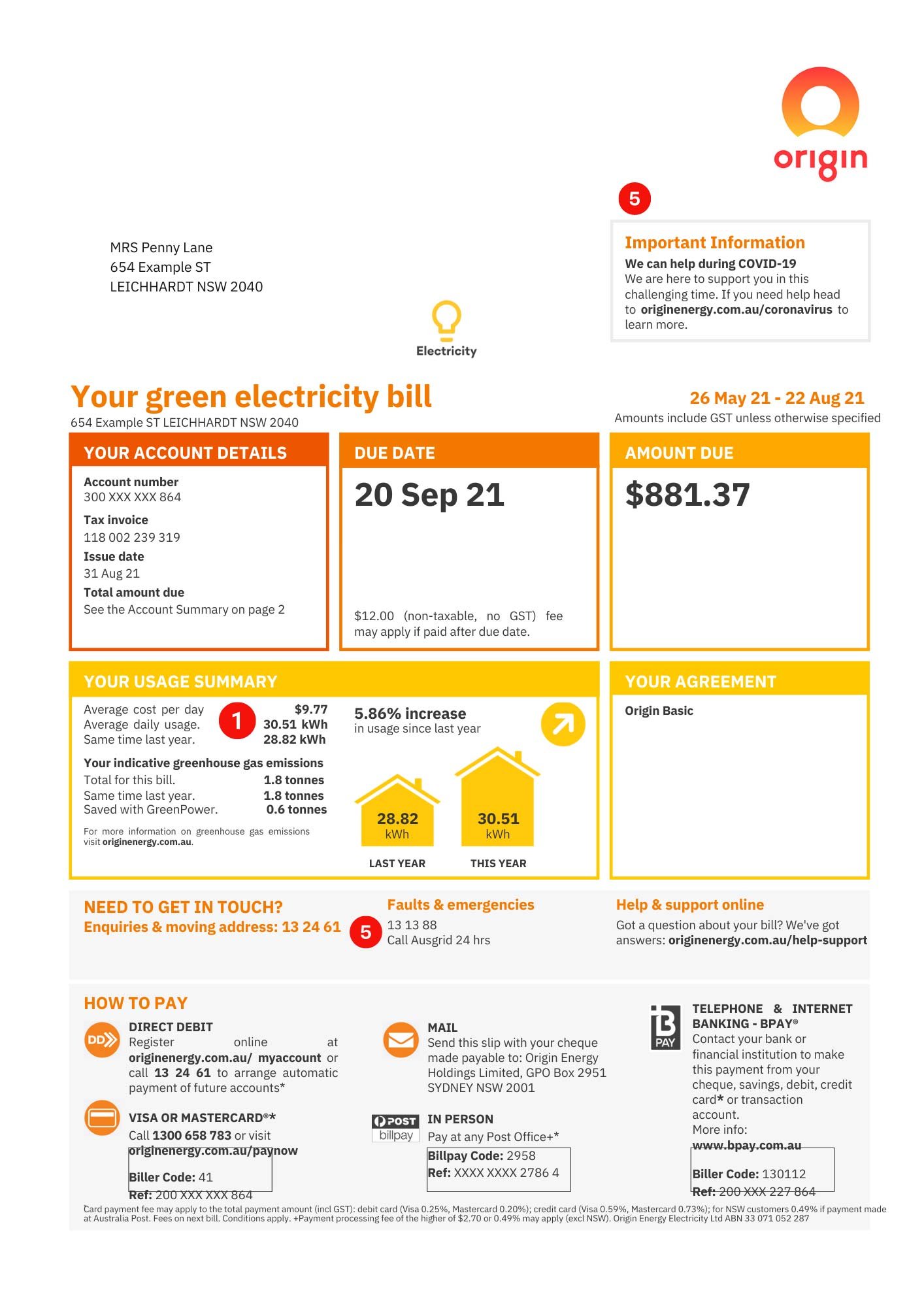


Example bill C
Solar feed-in tariff (FiT) and peak demand tariff/Energy Locals


Will you be using Premium SunSPOT for your home or property?
If 3D (LiDAR) data is available for your area and your Council has a subscription to Premium SunSPOT, you will see coloured dots when mapping solar panels to your roof which show how much sunshine it receives over a year. Premium SunSPOT offers the most accurate results!
If your area isn't covered, you can email your Council to suggest they consider subscribing to the Premium version of SunSPOT.
You can email your council using the button below to request they subscribe to Premium SunSPOT.

This map indicates where SunSPOT Premium is available. Some properties within the areas shown may not have access to SunSPOT Premium, as we filter for properties under 10 acres. This information is based on the data available at the time of mapping for SunSPOT.
Search List of Mapped Councils
How to get the most accurate version of SunSPOT
If you see dots over the roof of your building in the image, showing the best place for solar panel placement, your area has been mapped. This means you won’t be asked to estimate the tilt or orientation of your roof, or the amount of shading. Great!
If, when using SunSPOT, you are being asked to estimate the amount of shading, and answer questions about your roof, and there are no dots overlayed on the map image, then you can follow the link below to send an email to your council to request that they look into a subscription to SunSPOT. We can follow up with the council and explain further.
Find your Council’s email address, and add your suburb and name to the email, or write your own.
If SunSPOT is failing to calculate, or giving strange results, please check these 4 things